Keyman for iPhone and iPad: Uninstalling Keyboards
To uninstall keyboards, follow these steps:
Step 1)
With the keyboard visible, touch the globe key:

This will bring up a list of all currently installed languages, with the currently selected keyboard highlighted.
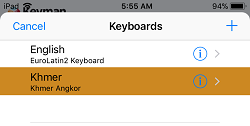
Step 2)
Swipe left on the keyboard you want to remove. You'll see a button to "Delete"
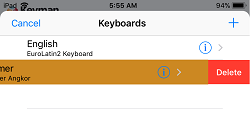
Step 3)
Click the "Delete" button to uninstall the keyboard.
The keyboard from the keyboard package is successfully uninstalled!