How To - Set the Language for Keyman Desktop Menus
Setting a Language for Keyman Desktop Menus
If you would like the menus in Keyman Desktop to be in a language other than English:
Open Keyman Configuration, from the Keyman menu in the Windows taskbar.
Click in the 'Display in:' menu on the top right corner.
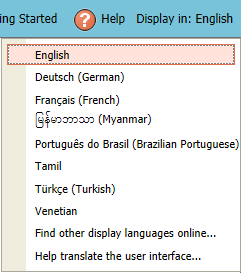
Select your language from the list. If your language is not in the list, click .
Note
If your language is not available online, you can write your own translation for your language using our local editor. For more information, see The Locale Editor - Translating the Keyman Desktop User Interface.Restart Keyman Desktop for the language changes to take effect for the entire program.