Keyboard Task - Uninstall a Keyboard
Uninstalling a Keyman keyboard removes it from Keyman Desktop. If you want to use the Keyman keyboard again it must be reinstalled.
Note
You can disable a keyboard temporarily, instead of uninstalling it. For more help, see: Keyboard Task - Enable and Disable a KeyboardTo uninstall a Keyman keyboard:
Open Keyman Desktop.
Click on the Keyman Desktop icon
 , on the Windows Taskbar near the clock.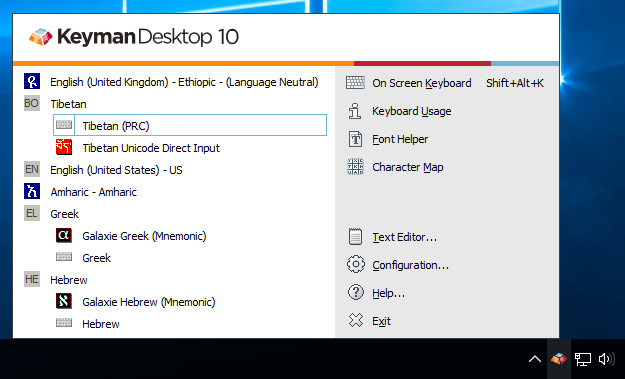
Select Configuration.
Select the Keyboard Layouts tab.
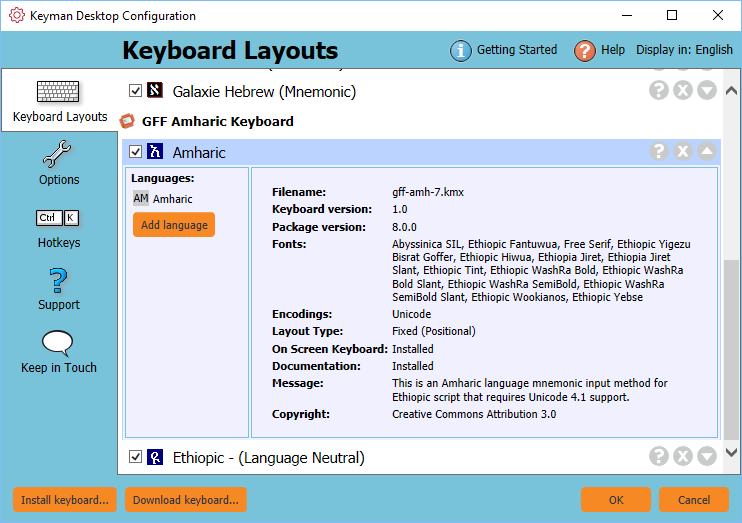
Click on the uninstall icon
 for the keyboard you want to uninstall.
A message box is displayed asking you to confirm this is the package or keyboard layout that you wish to uninstall. Click .
Click .
The Keyman keyboard is now removed from Keyman Desktop.